MENTORA
What is Mentora you ask? The short answer is that it is web responsive app that allows users to learn unique skills from mentors located all over the world in the form of online courses, online workshops and local apprenticeships. Users can support their mentors and the local community and help preserve skills that may soon be lost.
Project Journey
I worked on the project for 5 months, as an educational project. I wanted to work on this projects because I believe in the cultural importance of Mentora App and in its ability to connect users with mentors from diverse cultural backgrounds, allowing for the preservation and sharing of unique skills, knowledge, and traditions that may be at risk of being lost in the modern world.
Spoiler Alert!
Here is a small sneak preview of the App in 5 minutes, in case you are in a hurry, but if you really want to see the journey of designing Mentora, keep going!
DESIGN THINKING PROCESS
DESIGN JOURNEY
In my 10 years+ of experience in the Architecture and Design I have used the Design Thinking Process many times but this was the first way of using it in a UX context. The diagram below describes the steps of the Mentora project although I can say that it was not a linear process and I learned a lot along the way.
SAME PROCESS NEW WAYS
01 DISCOVER
PROBLEM STATEMENT
Busy people are overstimulated by technology when they are at home or while traveling so they need a way to learn analog skills or crafts and to have a genuine experience because sometimes life needs to be also about relaxing and spend less time online and do something meaningful and authentic, get inspired and help others while doing it.
We will know this to be true when we see people using the Mentora app on a daily basis to learn new things and using the Mentora app to improve their holiday experiences and immerse in the local communities and learn from them while also helping the community they visit in the process.
UNDERSTADING THE PROBLEM
COMPETITIVE STUDY
To better understand the market I began with a Competitive Analysis and found out that the main competitors of the Mentora app will be apps like Domestika, Skillshare, Masterclass that offer high quality online classes in different fields. For the local experience Apps like Get your Guide and Airbnb Experiences could be the competitors.
UNDERSTADING THE MARKET
BUSINESS DEMANDS
As a result of the Competitive Analysis I identified some key Business Requirements for Mentora and I went forward in defining some more Functional Requirements and interpret them trough User Stories.
UNDERSTANDING THE CHALLENGES
USER RESEARCH
To better understand the users and the context in which they are going to use the product I began the User Research. The first phase was to release a User Survey with questions meant to find out about the the process of learning unique skills from a mentor and what are the needs and goals of users in this process.
Based on the findings of the first phase, the second phase of the was to conduct the first round of User Interviews and learn in what frame would the users would like to learn and what they expect from that experience what are some constraints and possible pain points.
The third phase was the User Interviews Analysis and to organize the findings in affinity maps and identify findings draw some insights and and propose some to do’s so that the app can offer the most enjoyable user experience and also be profitable in order to help the mentors and support a local communities.
PHASES
FROM RESEARCH
KEY INSIGHTS
01 Learning Process
Users are interested to learn unique new skills but they struggle with learning something new, they get bored relatively fast and they are not motivated. Users will learn better and faster in an interactive way.
02 The Group Experience
The research made clear the users prefer smaller groups and those contribute to a very good learning experience. The size of the group can be a bit bigger online.
03 Monetizing
Monetizing will have to be done in a sensible way that is organic and not pushing users to buy anything from the app.
04 The Local Experience
Users can choose between lengths of local experiences that best fit their schedule. Users want fascinating experiences that focus on the Mentors and the community aspect.
05 Package Option
A lot of the features that the people wished for have to do with framing the experience. Having packages that include accommodation, transport and eating recommendations was important for the users.
02 DEFINE
VALUE PROPOSITION
Mentora is a web responsive app where people can learn unique skills from Mentors that continue traditions since thousands of years. Whether it is a tea ceremony in Kyoto, or traditional mask making in Bali or hat making in Transylvania these artisans are part of the living heritage of our world and they are slowly disappearing in a globalized world.
The Mentora App aims to bring these Mentors into the light and offer users the opportunity to share one of a kind experiences online as well as offline by directly interacting with these human treasures and keeping the crafts alive. Another feature that the app aims to offer is spending time in a local community offering a fulfilling experience for the user and the chance to support craftspeople and their communities.
DERRIVED FROM RESEARCH
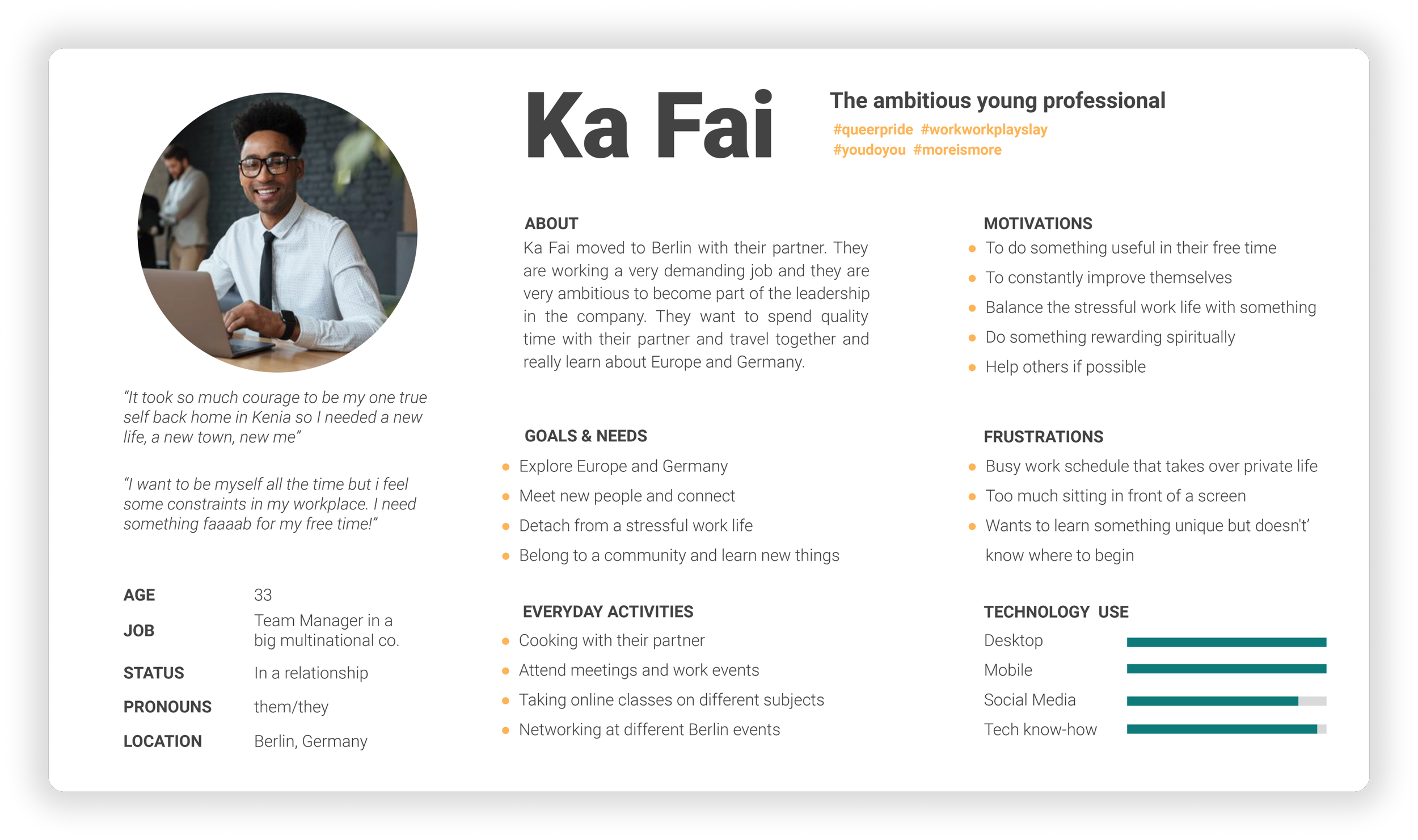
USER PERSONAS
To help me understand and empathize with Mentora’s users I have created some User Personas that allowed me to understand the needs and expectations of the users.
Anne is the fun loving divorcee that never had too much time for herself and is in a new phase of her life where she wants to live to the fullest. For her Mentora could offer unique local experiences where she would get to know new people and make friends on holiday.
Ka Fai is the ever busy millennial that is very focused on their career and doesn't have much free time. They want to do some relaxing activities and learn something unique.
For them Mentora could offer online opportunities to learn something together with their partner and spend time together doing something fun and different.
ANNE & KA FAI

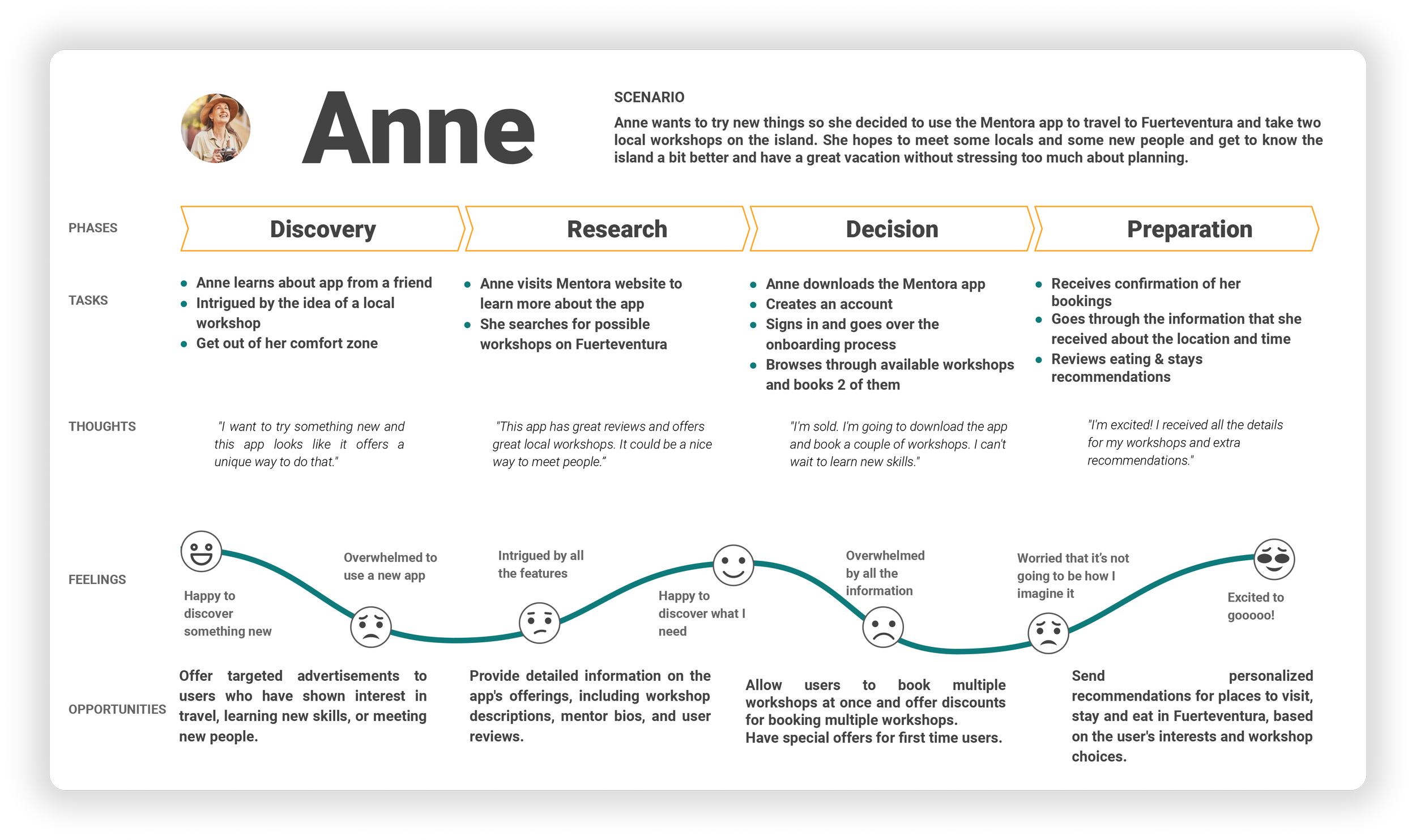
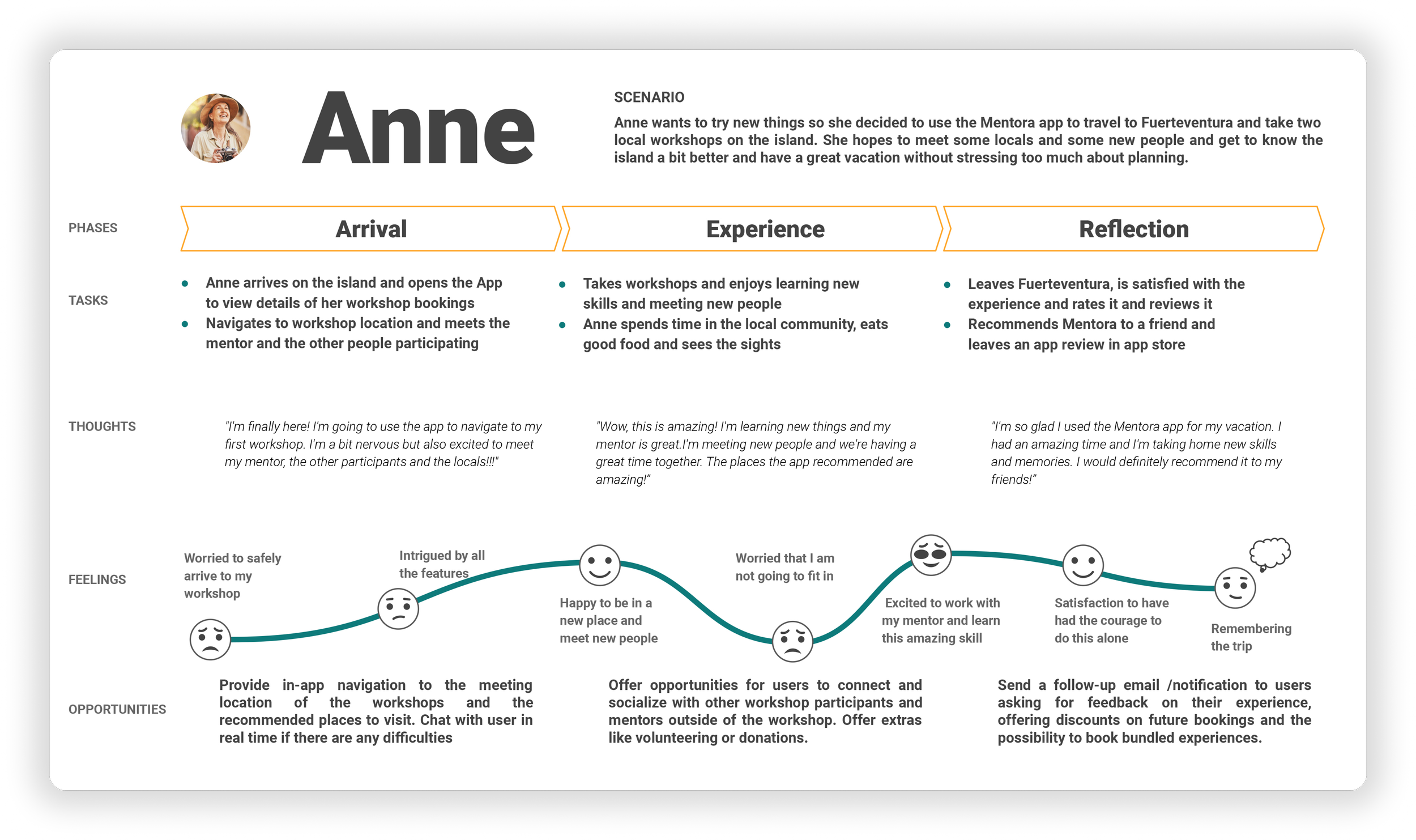
USER JOURNEY ANNE
To gain some more perspective about Anne I developed her User Journey. The phases of Anne's Journey are Discovery, Research, Decision, Preparation, Arrival, Experience and Reflection. It was important that the User Persona Anne have a very detailed User Journey and go through the most important User Journey Phases so that the user's needs would be covered and paint points could be identified.
the fun loving Divorcee
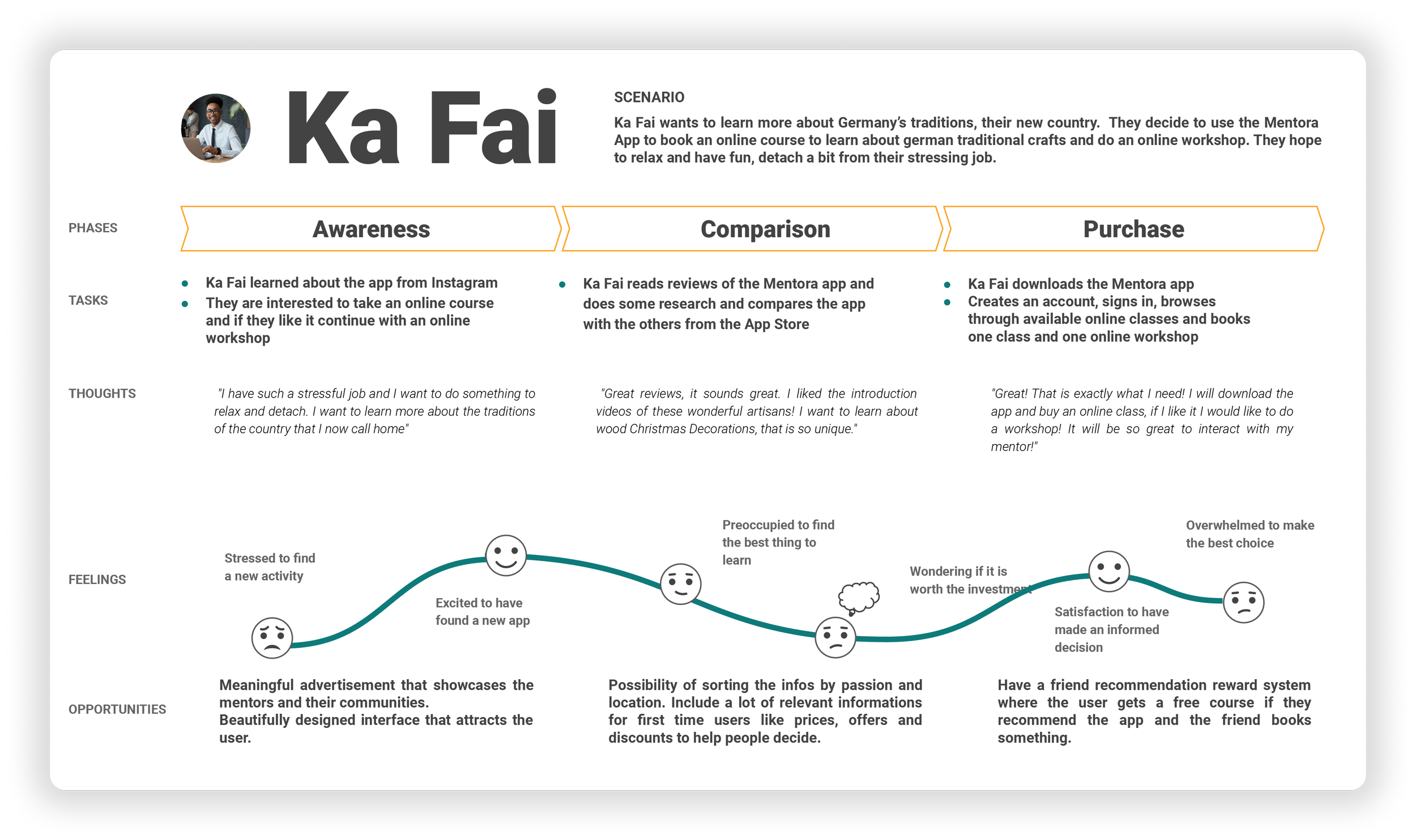
USER JOURNEY KA FAI
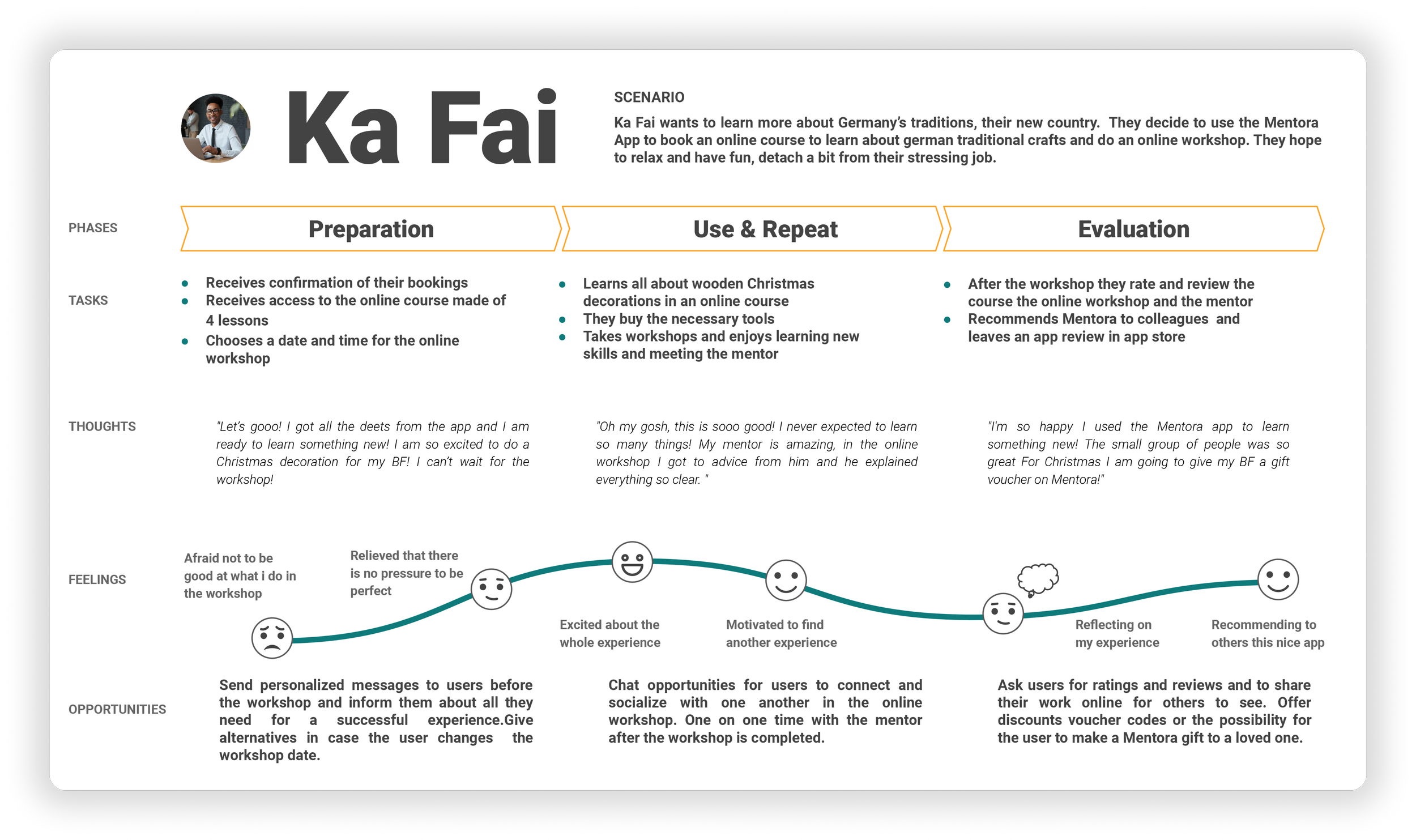
In order to better understand Ka Fai’s interaction with Mentora over a period of time I mapped his journey. The phases of Ka Fai's Journey are Awareness, Comparison, Purchase, Preparation, Use & Repeat and Reflection. The User Journey of Ka Fai reflects the User Persona of the busy career oriented millennial that is very Tech Savvy and that wants pursue online activities.
the ever busy Millennial
03 IDEATE
USER FLOWS
In order to create an intuitive interface and to demonstrate potential the user can take through a task and to frame and optimize the design I have created some User Flows
HOW THE APP WILL WORK
USER FLOW ANNE
Anne is not a tech savvy person and she never used an app to book holydays or accommodation
Known Information
Anne needs to find information, reviews about the availability and prices of local workshops and accommodation.
Needed Information
OBJECTIVE
Anne wants to book a workshop and accommodation in Mexico.
SUCCESS CRITERIA
Anne will know that her task is completed when she can view her booking in My Bookings
PROMPT
Anne wants to live in the local community during her workshops and discover the area.
USER FLOW KA FAI
Ka Fai is a very tech savvy person and they often use apps to book different experiences.
Known Information
Needed Information
OBJECTIVE
Ka Fai wants to book an online workshop to learn how to make a summer kimono for their partner.
Ka Fai needs to find a workshop that will satisfy their curiosity and get their attention.
PROMPT
Ka Fai wants to learn more about Kimonos and to interact with a mentor that can teach them.
SUCCESS CRITERIA
Ka Fai will know that their task is completed when they receives a confirmation about their online workshop.
SITE MAP OF MENTORA
In order to better understand the user needs I performed a Card Sorting experiment. The results that stuck with me the most were to find that the users were preoccupied with the experience more than anything.
My biggest surprise was to find out that my initial Site Map was way to complex and all the users wanted a very simple structure and not that much content as I previously anticipated. So I went ahead and simplified the Site Map accordingly to the findings.
LEARNINGS FROM CARD SORTING
I started to create a Low-Fi Wireframes for the Mentora App and that was a crucial step for me in testing and iterating design concepts early on in the development process to ensure that the app meets the needs and expectations of the target audience.
PAPER SKETCHES
LOW FI WIREFRAMES
MID FI WIREFRAMES
The creation of the Mid-Fidelity Wireframes allowed me a more realistic representation of the user interface and user interactions. It also enabled me to refine the user flows and navigation before moving on to higher-fidelity wireframes. I started to learn Figma and this experience enabled me to go forward in the design process.
LEARNING FIGMA
Creating High-Fidelity Wireframes and a Prototype for Mentora was crucial in visualizing and refining the product . It allowed me to fine-tune the user experience and user interface, providing a more polished and effective product for users to interact with. It was the most important stage in preparing for the first phase of User Testing.
PREPARING FOR PROTOTYPING
HI FI WIREFRAMES
04 PROTOTYPE
THE PROTOTYPE
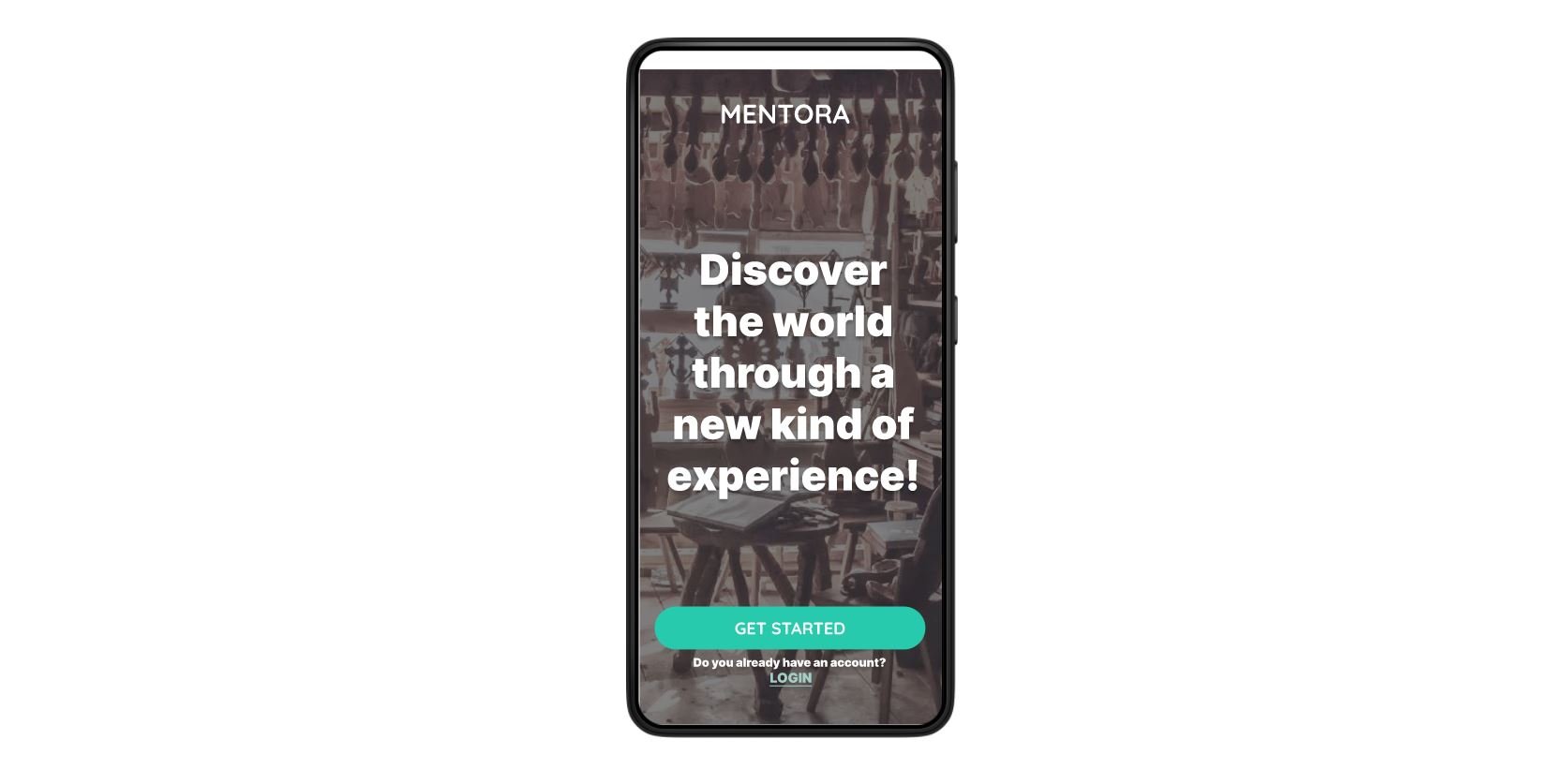
Prototyping allowed me to prepare for early user testing and iteration of my first design solution to ensure the best possible user experience. It helped me to identify usability and design issues before investing further resources.
The Prototype allows users to provide feedback on the app's overall concept and features, helping to ensure that the final product meets their needs and expectations.
PREPARING FOR USER TESTING
05 TEST
USER TESTING
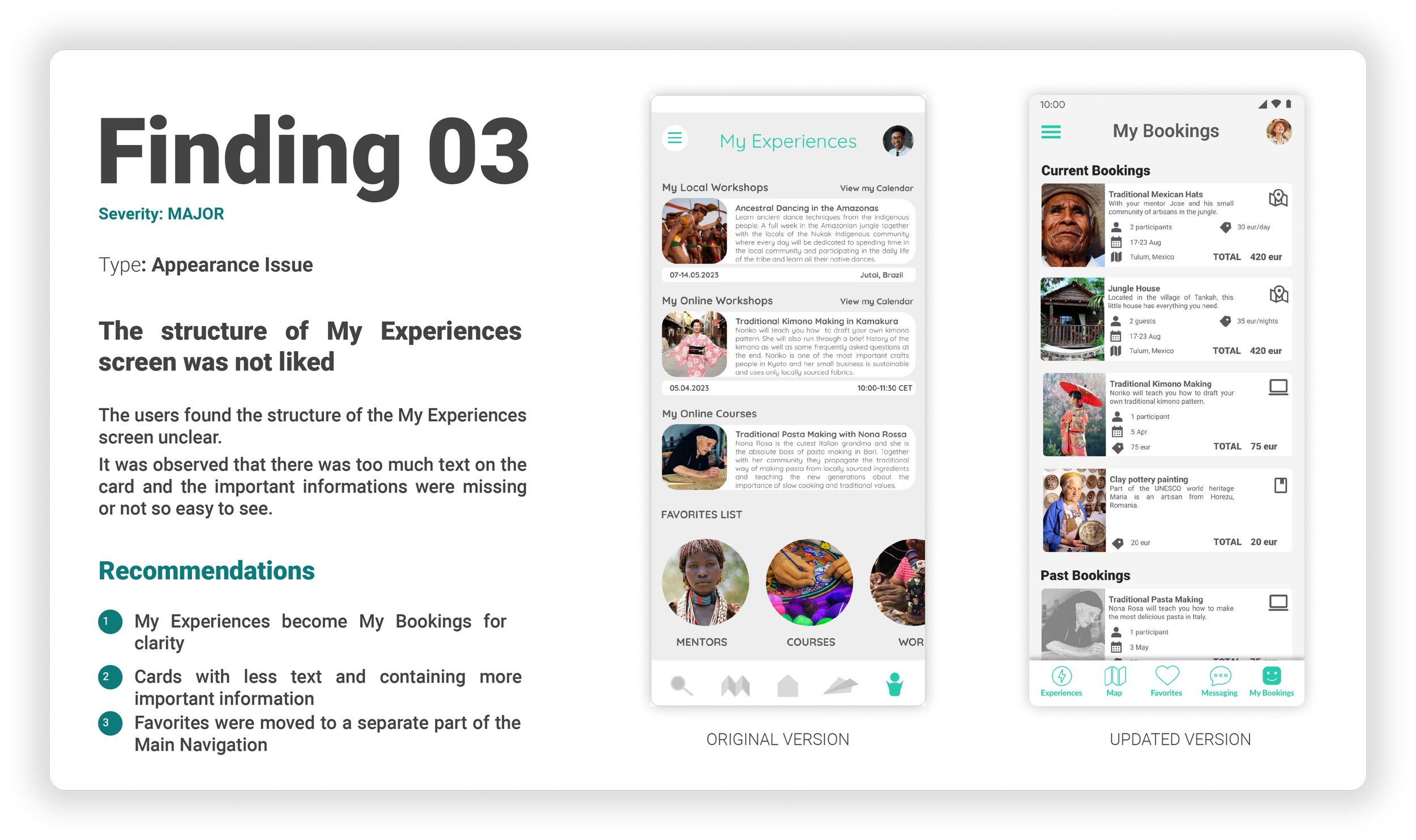
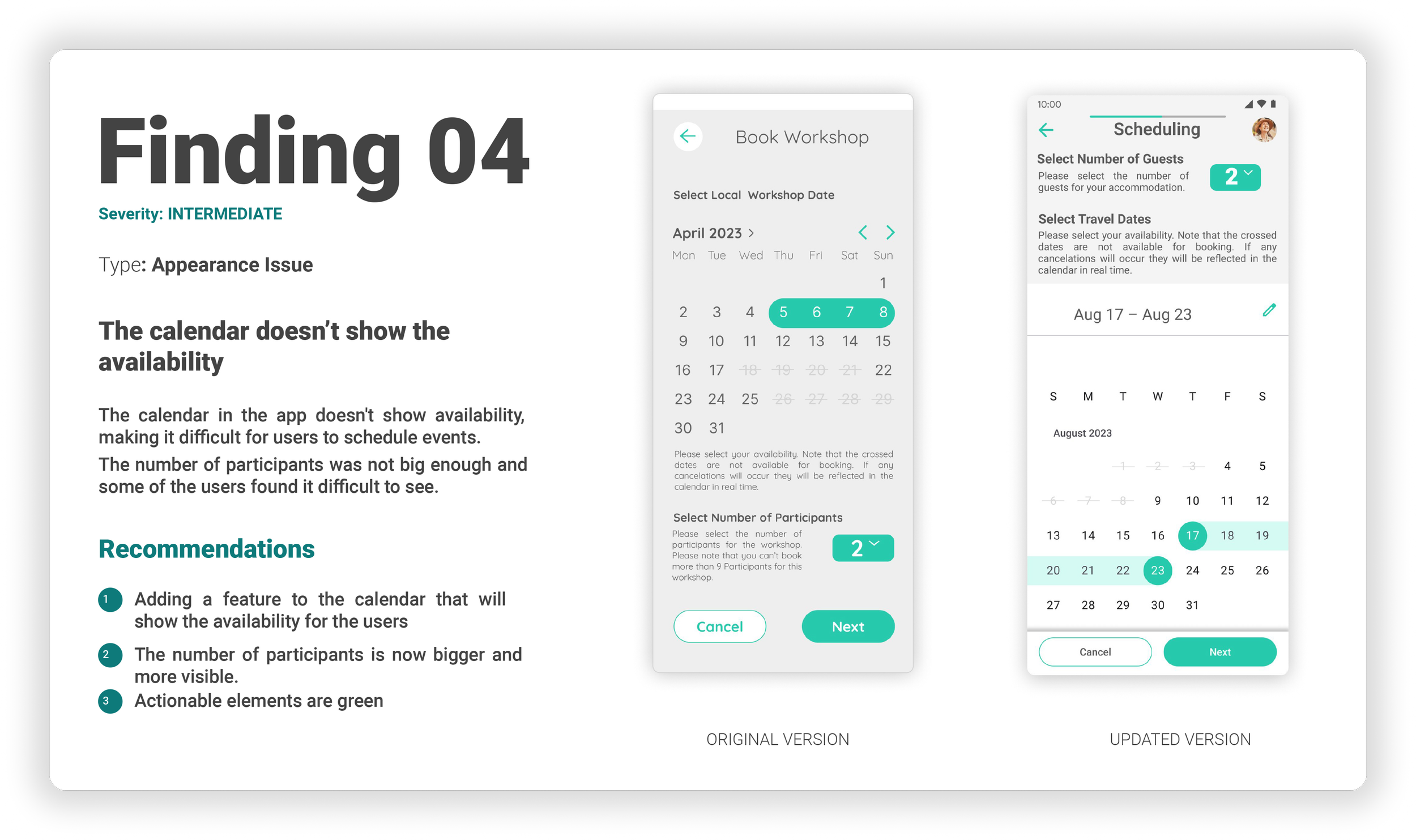
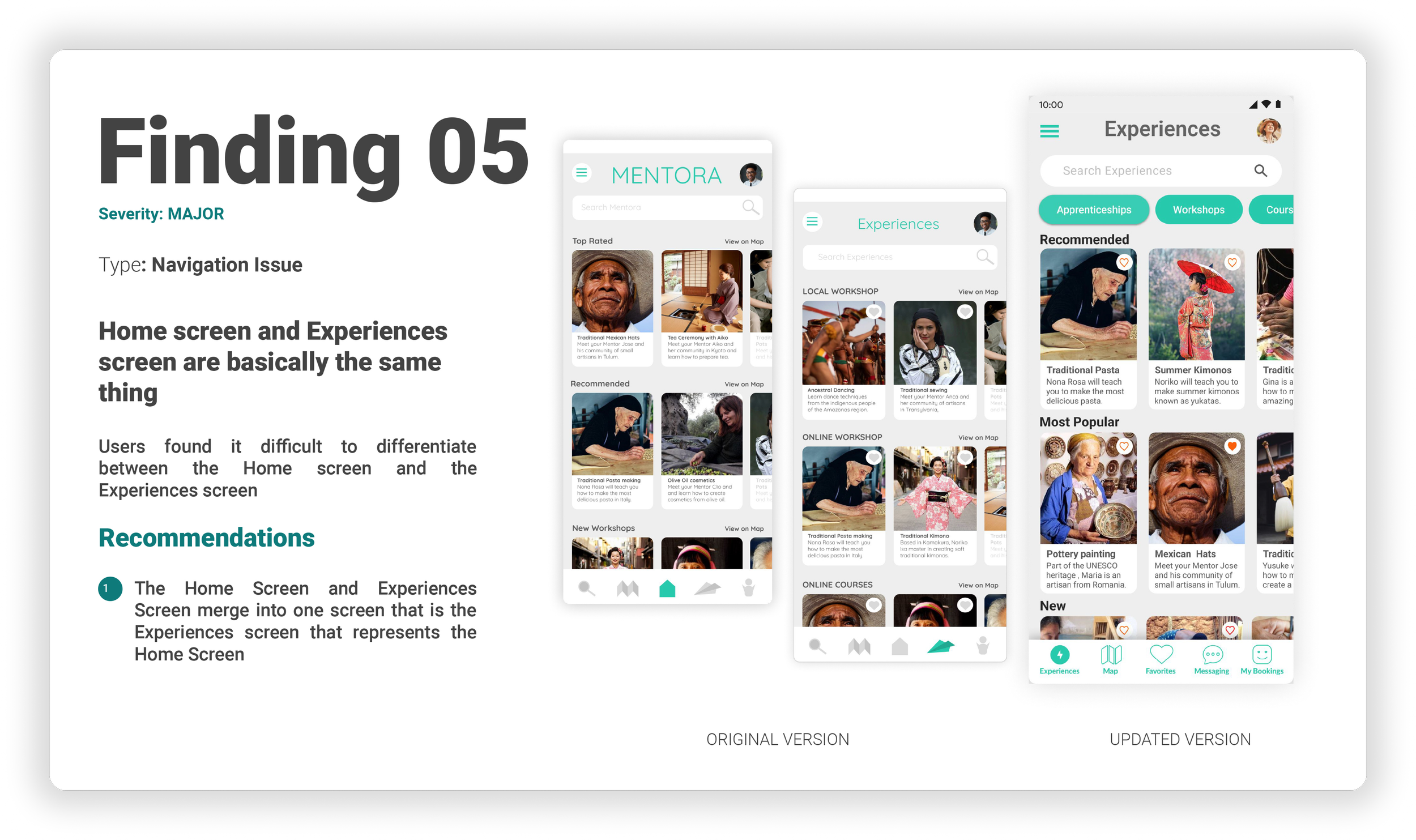
The scope of the User Testing was to evaluate the user experience of the Mentora app, which is designed to connect people with skilled artisans from all over the world through online courses, online workshops, and local workshops. The primary goal was identify usability issues and areas for improvement in the Mentora app.
In order to properly conduct the User Testing I elaborated a detailed Usability Test Plan as well as a Usability Test Script.
In order to validate the design of the Mentora App I conducted six User Interviews. Four Moderated in Person User Interviews, and two Moderated Online User Tests. The people were aged between 32 and 40 years old.
After the User Interviews an Usability Analysis was made a Usability Test Report was created where facts were organized in affinity maps and a rainbow spreadsheet in order to identify issues and draw some insights.
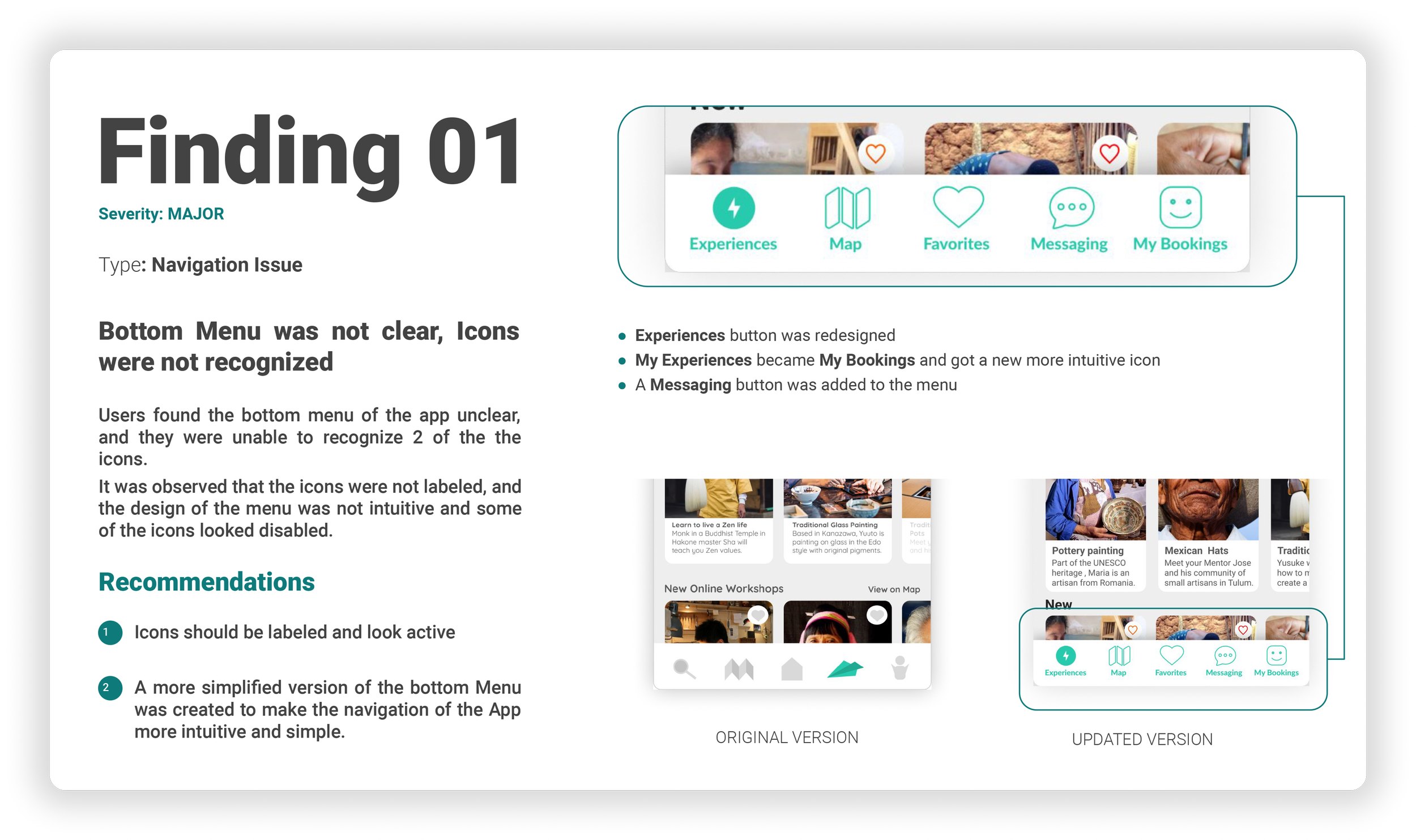
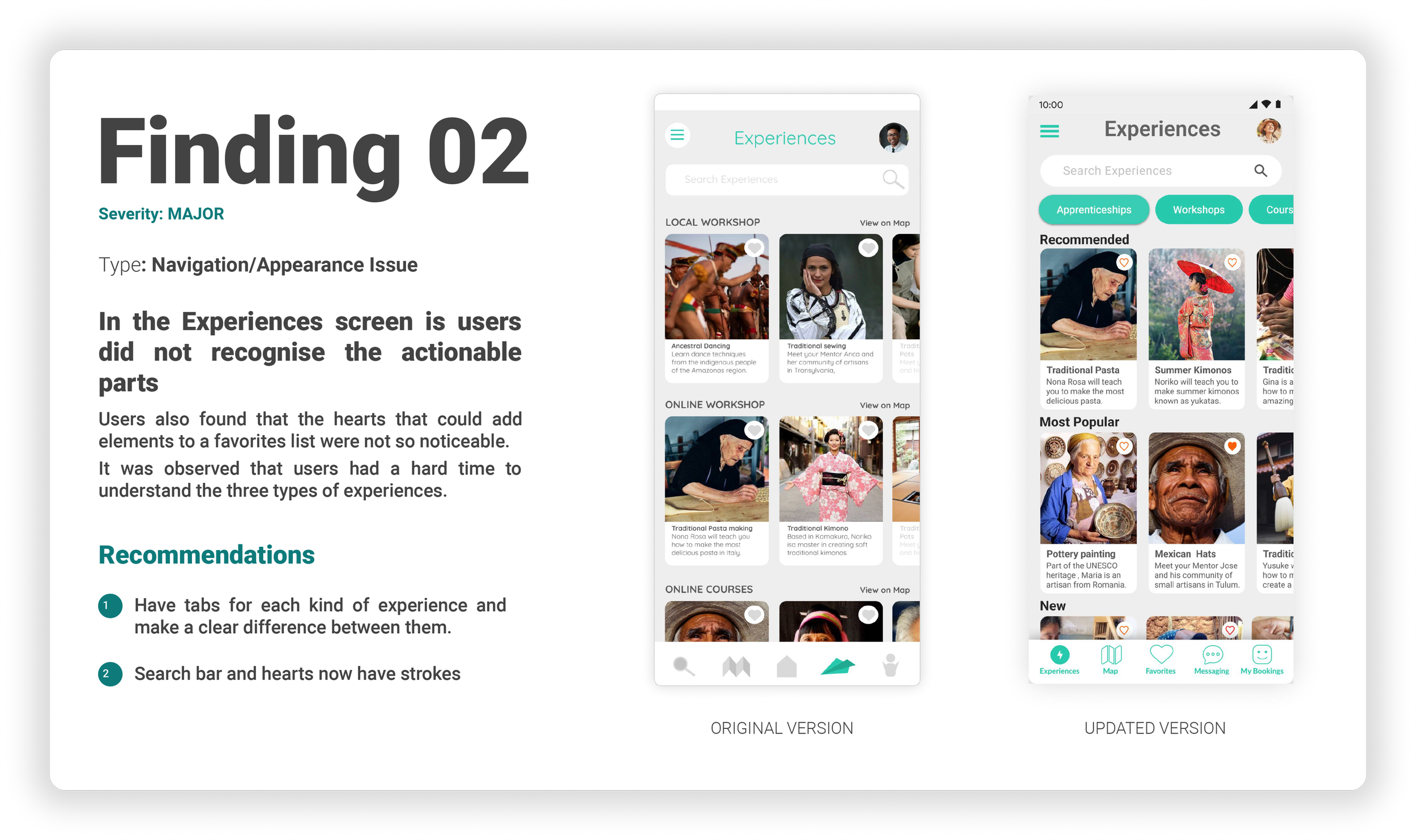
I could finally gather and categorize the most important findings and make some recommendations.
PREFERENCE TEST
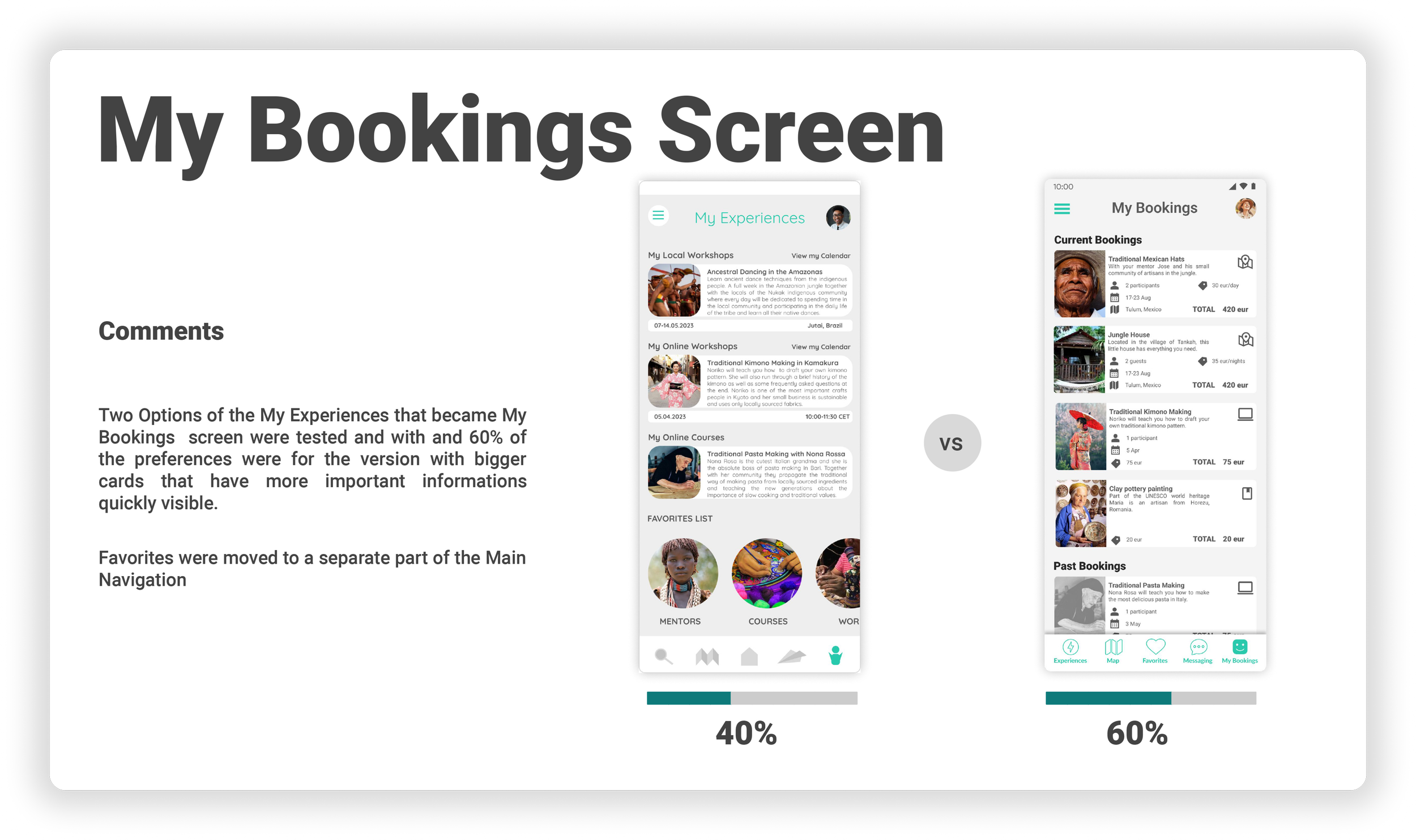
The Preference Test was conducted with ten subjects and they had to choose between two options of different screens. The results are below.

06 IMPROVE
REFINING
After conducting User Testing the Design Thinking Journey continued into Refining the Design by an iterative process of continuously improving and enhancing the visual aesthetics of the app by refining the layout, typography, color schemes, icons, and other visual elements. This meant the creation of a consistent visual language, improving the visual hierarchy.
I have created visual assets that were used during the design process to communicate and document the visual aspects of the user interface design of Mentora. I included a Style Guide that that outlines the visual design elements and guidelines for Mentora.
In my case this Visual Design Document included information on color palettes, typography, iconography, visual hierarchy, spacing, grids, as well as guidelines on how these elements should be used consistently across different screens and components.
THE DESIGN
ACCESIBILITY
I also made sure that the app is accessible to most users, including those that are differently abled. I created a Accessibility Document to make the principles more evident. I refined the colors of the app, I worked on contrast and increased the font sizes to be more inclusive.
INCLUSIBILITY
DESIGN EVOLUTION
I want to showcase the Design Evolution of Mentora because it is evocative of my learning process during this project. As this was my first UX Design project I am aware that I have a lot to learn but I am happy that I got to explore the UX Design Thinking process through Mentora.
EXPLORATION
LATEST RESULTS
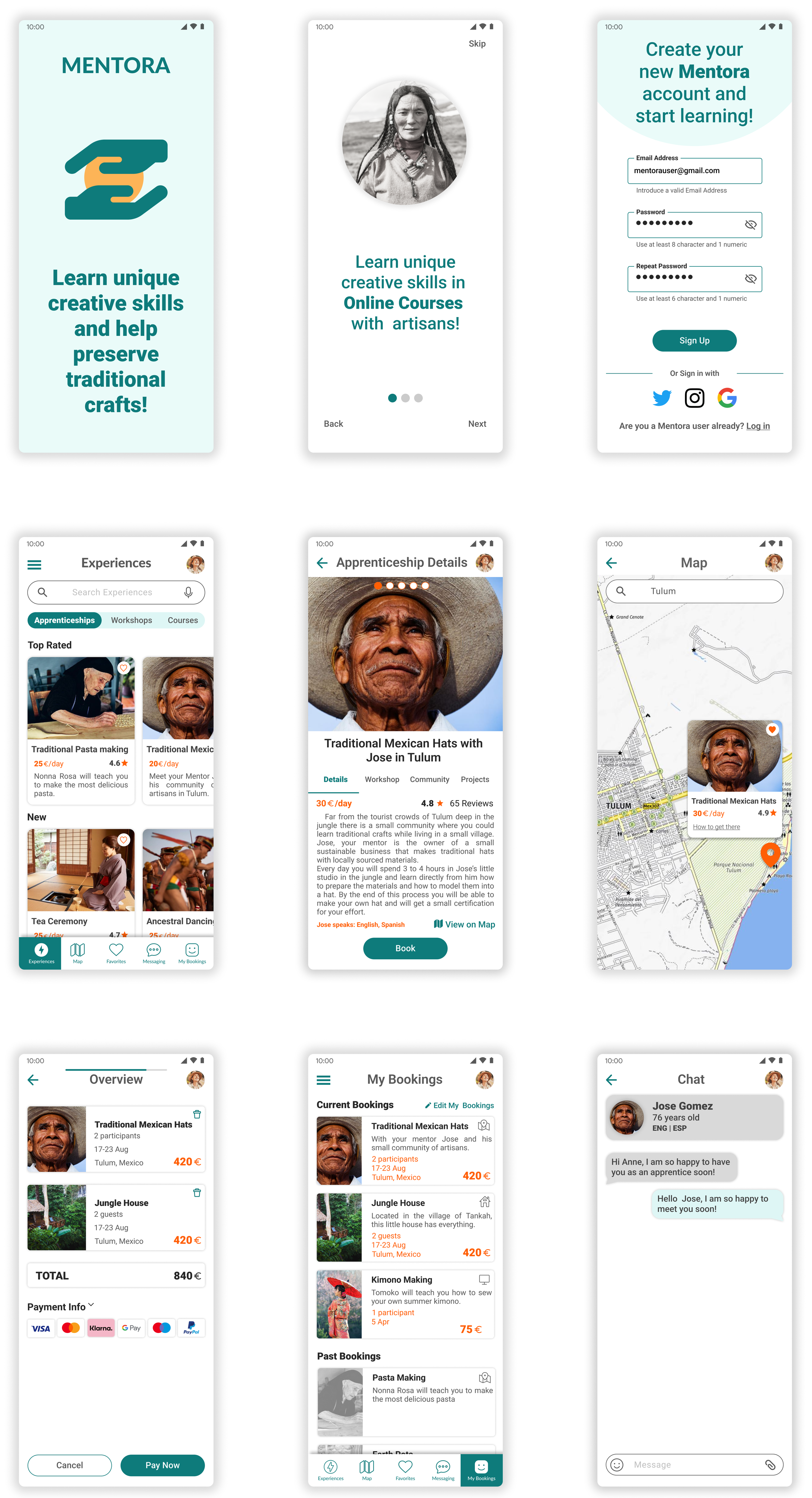
As I progressed to the final wireframes for Mentora App, I felt confident in my design decisions and excited to see the project come to life but I am aware that there is a long way to go until developing such a project and I am aware that more testing and improvements need to be done.
I took great care in ensuring the wireframes accurately represented the user flow and visual hierarchy, and I hope the interface will feel intuitive and easy to use for the users.
WIREFRAMES
LATEST PROTOTYPE
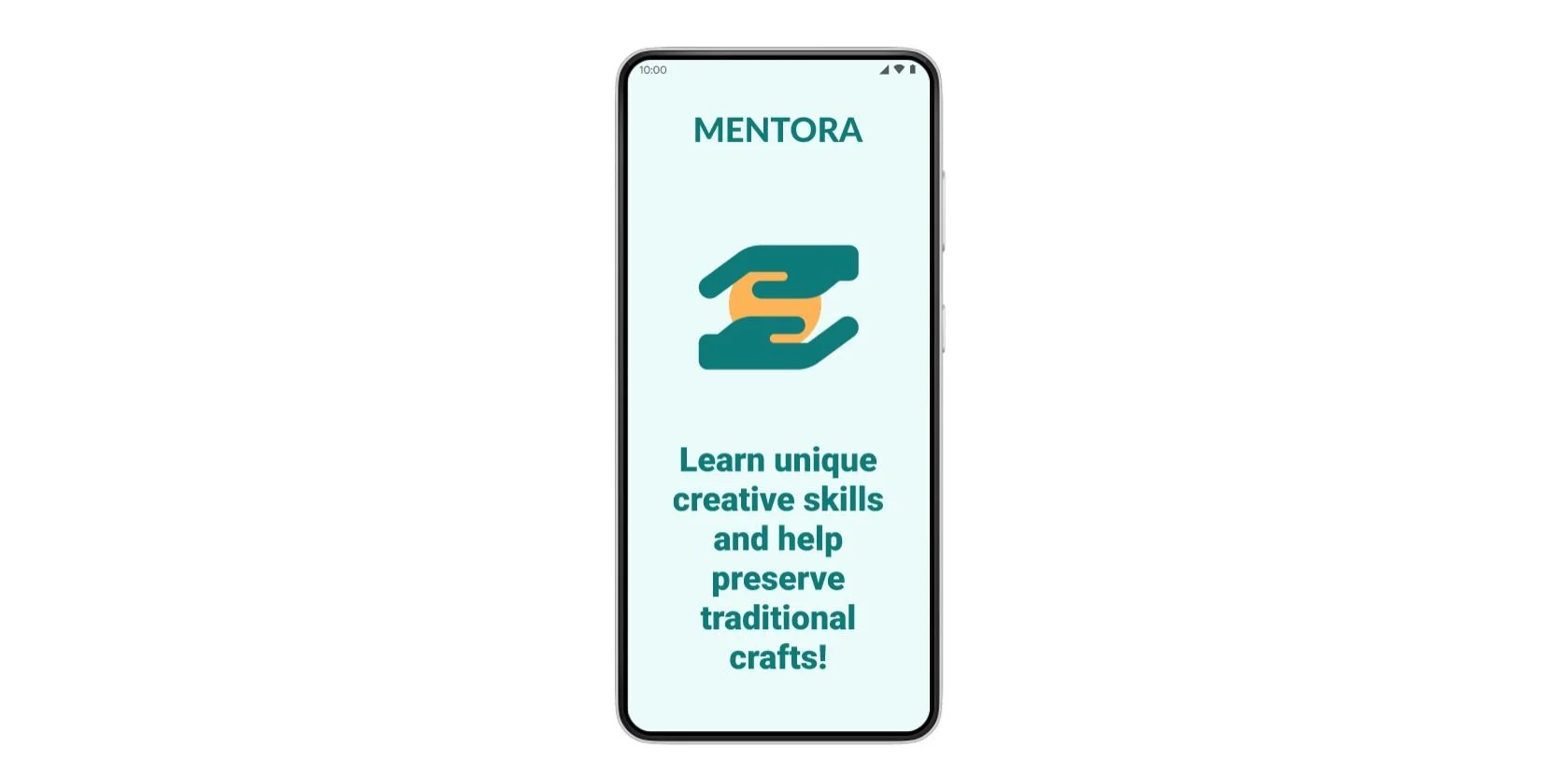
As I continued to work on the Mentora App, I progressed from wireframes to a fully functional interactive prototype. Creating the prototype will allow me to further test the usability of the app and see how users interact with the various features. Through this process, I want to identify areas for improvement and refine the design to create a more seamless user experience.
OF MENTORA
What I learned along the way
Designing the Mentora App was a challenging but fulfilling journey of learning. In the Discovery phase, I learned the importance of understanding the target audience and their needs, as well as researching the competition. During the Define phase, I focused on defining the features and functionalities of the app, which helped to identify the app's unique selling points and value proposition.
During the Ideate phase, I brainstormed various concepts and features that could make Mentora an app that brings value to society. This involved creative and out-of-the-box thinking, which was a fun and exciting part of the design process. I learned how to transform my ideas into tangible designs and develop wireframes that could be tested with users.
The Test phase was a critical step in the design process as it allowed me to collect feedback and improve the user experience. Through user testing and feedback, I discovered pain points and opportunities for improvement. It was a humbling experience to receive feedback, but it allowed me to improve the design of Mentora.
Overall, designing the Mentora App taught me the importance of understanding the user's needs, the value of creative thinking, and the iterative process of design. The journey was challenging, but the end result was a product that could help users learn new skills and support mentors and their communities. I look forward to continuing to learn and grow as a designer, taking the lessons learned from this project into my future work.
“Every Design Journey is an iterative process, I need to stop being afraid to continuously make changes and always keep on trying new things ”
Yours truly, Sabina Pip